
Download BoostPixels Flat – AI Image Generation, Free, Secure, High‑Quality Visuals
BoostPixels Flat is the newest web‑based AI image generator that lets designers, marketers, and hobbyists produce professional‑grade visuals in seconds. With a focus on brand‑aware rendering, privacy‑first architecture, and cross‑platform accessibility, the tool removes the need for bulky desktop software while delivering print‑ready assets. Whether you need a flat‑lay product shot for an e‑commerce site or a custom illustration for a presentation, BoostPixels Flat combines powerful deep‑learning models with an intuitive interface to make AI‑driven design effortless.
Overview of BoostPixels Flat
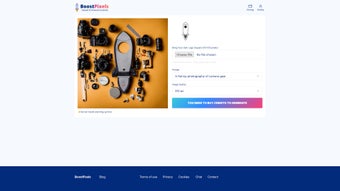
BoostPixels Flat operates entirely in the browser, meaning there is no download, installation, or license key to manage. Users simply log in, upload a brand logo (PNG, SVG, or high‑resolution JPEG), and type a natural‑language prompt. The AI then generates a visual that respects the brand’s color palette, style guidelines, and composition rules.
Two output modes are available: a “Fast Draft” that produces a low‑resolution preview within 5‑10 seconds, and a “High‑Resolution” mode that renders up to 4 K quality for print or high‑density displays. The platform’s architecture encrypts every upload in transit (TLS 1.3) and stores data for a maximum of 24 hours, after which it is automatically purged. This privacy‑first approach is ideal for agencies handling sensitive brand assets.
The service also includes a curated gallery of pre‑made concepts, ranging from minimalist flat‑lays to complex technical schematics. Users can browse, favorite, and instantly download any gallery image, providing a fast source of inspiration or a ready‑made asset when time is limited. BoostPixels Flat’s blog updates weekly with tutorials on prompt engineering, case studies of successful campaigns, and deep dives into the underlying AI technology. Because the tool runs on any modern browser, it is accessible on Windows, macOS, Linux, Android, and iOS devices, making it a truly universal solution for distributed teams.
In addition to the core generation engine, BoostPixels Flat offers collaboration features such as secure shareable links that expire after 48 hours, version history for the last ten renders, and the ability to comment directly on generated images. These capabilities streamline feedback loops between designers and clients, reducing the typical back‑and‑forth of file exchanges. Overall, the platform’s blend of speed, quality, and security positions it as a strong contender in the rapidly growing AI‑generated imagery market.
Key Features and Capabilities
- AI‑Powered Prompt Engine – Transform natural‑language descriptions into fully rendered images.
- Logo‑Aware Rendering – Seamlessly integrate uploaded brand logos into generated scenes.
- Dual Quality Modes – “Fast Draft” for rapid ideation; “High‑Res” for print‑ready 4 K output.
- Extensive Prompt Library – Pre‑defined categories (flat‑lay, product showcase, technical diagram, etc.).
- Responsive Web Interface – No downloads required; works on desktop and mobile browsers.
- Privacy‑First Architecture – End‑to‑end encryption; temporary storage limited to 24 hours.
- Creative Blog & Tutorials – Weekly posts on AI trends, prompt best practices, and real‑world use cases.
- Export Options – PNG, JPEG, WebP with customizable DPI and color profile settings.
- Collaboration Tools – Secure shareable links, comment threads, and version history.
- API Access (Roadmap) – Planned REST endpoints for automated integration with design pipelines.
Each feature has been engineered to reduce friction for creative professionals. The prompt engine leverages a transformer model fine‑tuned on millions of design‑specific images, ensuring that the AI respects composition principles such as rule‑of‑thirds, balanced lighting, and consistent branding. The logo‑aware renderer includes a dedicated encoder that detects vector boundaries and color information, allowing the AI to place the logo naturally within a scene—whether embossed on packaging, floating in a minimalist background, or integrated into a product prototype.
Beyond core generation, the Prompt Library serves as a living repository of successful prompts, organized by industry and visual style. Users can click a suggestion to instantly populate the text field, then adjust parameters to suit their unique needs. The blog complements this by offering step‑by‑step guides on topics like “Crafting Effective Flat‑Lay Prompts” and “Optimizing Export Settings for Print Media.” These resources empower even novice users to achieve professional results without a steep learning curve.
Finally, the upcoming API will enable teams to automate image creation directly from design tools or content management systems, further extending BoostPixels Flat’s utility in large‑scale production environments.
Installation, Setup, and Daily Use
Getting Started – No Installation Required
Because BoostPixels Flat is entirely web‑based, onboarding is a breeze. Visit the official site, click “Sign Up,” and confirm your email. After logging in, the dashboard greets you with a prominent “Create New Image” button. Upload your logo (PNG, SVG, or high‑resolution JPEG) and the system instantly validates size, format, and transparency. If the file is below the recommended 500 × 500 px threshold, the platform suggests a scaling option to maintain crispness.
Crafting Prompts and Selecting Quality
The prompt field accepts free‑form text, but you can also pull from the Prompt Library with a single click. For example, typing “modern flat‑lay of a ceramic coffee mug on a reclaimed wood table, soft natural light, subtle shadows” yields a photorealistic composition within seconds. Toggle between “Fast Draft” (rendered in under 10 seconds) and “High‑Resolution” (taking 30‑45 seconds for up to 4 K output). The UI displays a real‑time progress bar, and you can pause or cancel a render if you need to adjust the prompt.
Downloading, Sharing, and Managing Assets
Once the AI finishes, a preview appears with zoom and pan controls. Click “Download” to save the image in PNG, JPEG, or WebP, selecting DPI (72 – 300) and color profile (sRGB or Adobe RGB). For collaborative workflows, generate a secure link that expires after 48 hours; the link grants view‑only access without exposing the original prompt or logo. The platform automatically retains the last ten renders in a temporary history, enabling quick retrieval or minor edits without starting from scratch.
Troubleshooting Common Issues
If a render fails, BoostPixels Flat provides a clear error message such as “Logo size too small” or “Prompt contains unsupported characters.” Typical resolutions include resizing the logo, simplifying the prompt, or refreshing the browser. Because the application relies on modern JavaScript and WebGL, using the latest versions of Chrome, Edge, Firefox, or Safari ensures optimal performance. For users on corporate networks, disabling aggressive ad‑blockers or proxy filters may prevent connectivity hiccups.
Overall, the workflow from sign‑up to final download can be completed in under two minutes for most standard use cases, making BoostPixels Flat an exceptionally efficient tool for fast‑paced creative teams.
Compatibility, Pros & Cons, and User Experience
Supported Operating Systems
BoostPixels Flat runs on any device with a modern web browser, including Windows 10/11, macOS Monterey and later, most Linux distributions, Android 8.0+, and iOS 13+. The responsive design automatically adapts to desktop, tablet, and smartphone screens, guaranteeing a consistent experience regardless of hardware.
Pros
- Zero‑install, instantly accessible from any browser.
- High‑quality AI output that respects brand assets and visual style.
- Dual quality modes accommodate both rapid brainstorming and print‑ready production.
- Strong privacy policy; all data is encrypted and retained for no longer than 24 hours.
- Extensive prompt library and educational blog for continuous skill development.
- Collaboration features such as secure shareable links and version history.
- Future‑ready API roadmap for automated workflow integration.
Cons
- Requires a stable internet connection; offline generation is not currently supported.
- Free tier limits the number of high‑resolution renders per month, encouraging an upgrade.
- Advanced customization (e.g., custom color palettes or texture controls) is limited in the current UI.
- Export DPI options are capped at 300, which may be insufficient for ultra‑large format printing.
- Some complex prompts may produce unexpected compositions, requiring iterative refinement.
Overall User Experience
Feedback from designers and marketers highlights the platform’s intuitive interface and the speed of the Fast Draft mode as major strengths. The logo‑aware engine eliminates the tedious manual compositing step, saving hours of post‑production work. Users appreciate the transparent privacy policy and the ability to share assets securely without exposing proprietary prompts. The primary criticism revolves around the quota on high‑resolution exports in the free plan, which nudges power users toward a modest subscription. Nevertheless, the combination of cross‑platform accessibility, robust feature set, and continuous educational content makes BoostPixels Flat a valuable addition to any creative workflow.
Frequently Asked Questions
Can I use BoostPixels Flat for commercial projects?
Yes. All images generated under a paid subscription are cleared for commercial use. The free tier also permits commercial usage, but you must respect the export limits and credit the platform where appropriate.
What file formats can I upload for my logo?
BoostPixels Flat accepts PNG, SVG, and high‑resolution JPEG files. For best results, use a transparent PNG or SVG with a minimum dimension of 500 × 500 pixels.
Is there an offline version of BoostPixels Flat?
Currently, the service is cloud‑based only. An offline desktop client is under consideration for future releases, but at present an internet connection is required.
How does BoostPixels Flat protect my uploaded logo?
All uploads are encrypted in transit using TLS 1.3 and are stored temporarily (max 24 hours) on secure servers. The platform’s privacy policy guarantees that logos are not used for training other models or shared with third parties.
Can I integrate BoostPixels Flat with my existing design workflow?
Yes. While a full API is slated for a later update, you can already export images in common formats and share secure links directly with teammates. Exported assets import seamlessly into Adobe Photoshop, Figma, Sketch, and other industry‑standard tools.
Conclusion & Call to Action
BoostPixels Flat stands out as a secure, high‑quality AI image generator that blends ease of use with brand‑aware customization. Its web‑only delivery removes the friction of installations, while the dual‑quality output ensures you have the right resolution for any stage of a project. For marketers, designers, and small businesses looking to accelerate visual production without compromising privacy, BoostPixels Flat offers a compelling free tier and an affordable upgrade path for power users. Ready to transform your creative workflow? Download BoostPixels Flat now and start generating stunning visuals in seconds.



.png)



